


MHD Flasher
4.5176.00 Reviews
App Specs
- Version
- 5.26
- Updated On
- License
- Free
- Downloads
- 100,000+
- Developer
- MHD Tuning UG
- Categories
- Auto & Vehicles
- Platform
- Android
Screenshots
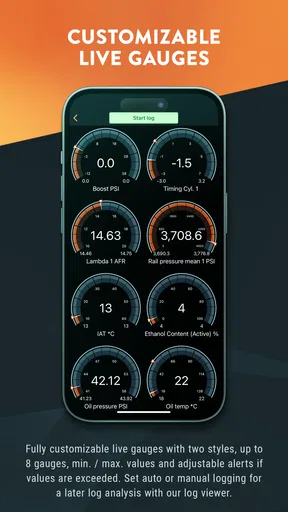
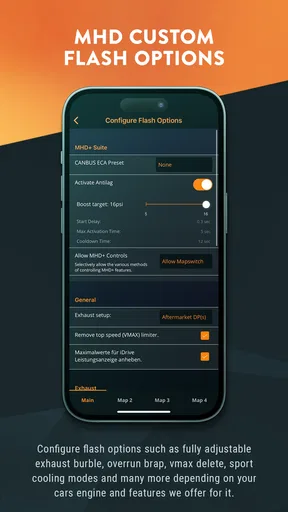
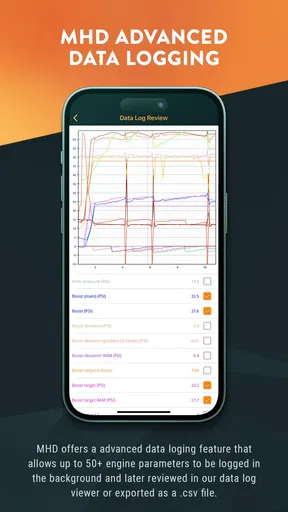
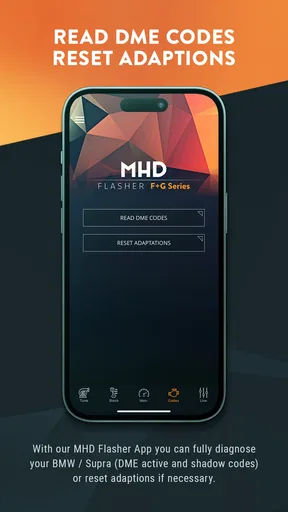
 Analysis by AppCompare
BMW owners usually approach a tuning app with a very different mindset from someone installing a casual driving companion. The question is not simply whether the interface looks polished; it is whether the app fits a careful workflow, communicates clearly during important moments, and makes sense for the vehicle and phone being used. After spending time with MHD Flasher, I see it as a focused tool for people who already understand that changing engine software is a serious, deliberate job rather than a quick tap-and-go customization.
Developed by MHD Tuning UG, this free Android app sits in the Auto & Vehicles category and is aimed squarely at BMW flash tuning. Its central appeal is concentration: instead of surrounding the user with unrelated vehicle features, it is built around the flashing process and the tuning choices connected with it. That narrow purpose is a strength, but it also means the app is not a universal answer for every BMW owner. If you want ordinary maintenance reminders, fuel tracking, navigation, or a broad car-management dashboard, you will need something else.
What using MHD Flasher feels like in practice
The first thing I would tell a friend is to treat this application like workshop equipment. The free download removes the initial barrier to trying it, but the serious tuning functions are connected with in-app purchases ranging from $99.99 to $249.99 per item. That pricing changes the decision completely: this is not an app I would install casually just because it is free. I would first make sure my BMW, phone, connection setup, and intended tune are all suitable before spending money inside the app.
The app has a 4.5 average from around 1.1K ratings, with more than 100K installs. Those figures suggest that it has reached a meaningful audience without making it feel like a mass-market utility. I read that as a useful sign for a specialist product, but not as a substitute for checking your own vehicle requirements. A strong rating cannot guarantee that every BMW configuration, Android handset, or tuning goal will behave identically.
My preferred way to use a tool like this is with preparation done before opening the flashing screen. I would charge the phone, remove distractions, place the vehicle somewhere safe, and avoid starting the process when I am in a hurry. I would also keep the car stable and make sure I understand which software choice I am about to apply. The fastest flash is the one you do not have to repeat because the preparation was rushed.
Speed expectations: where the app should and should not feel fast
Perceived speed matters here, but it needs to be judged differently from a social or navigation app. I do not expect MHD Flasher to feel instantly responsive in the same way as a notes app. The important experience is whether screens open cleanly, choices are understandable, and the flashing workflow progresses without confusing pauses. A tuning operation involves communication with the vehicle, so impatience is a poor reason to interrupt it.
On a compatible device, I would expect the ordinary app interface to feel lighter than a feature-packed automotive suite because its purpose is narrow. That does not mean every operation will be quick. The actual flash is the kind of task where connection quality, vehicle state, phone performance, and the selected software all influence the experience. I would judge success by clear progress and a finished result, not by trying to force the process to match the speed of a normal app download.
Worth Reading Before You Choose

EA SPORTS FC Mobile 26 Is a Bigger Football Game, but It Takes Time

Flipboard Shows What News Apps Must Do Beyond the Feed

Switching to Android Auto Means Rethinking Your Driving Routine

Google Calendar Makes a Crowded Week Easier to Manage

Ludo King Makes the Most of the Minutes Between Plans

Baby Panda World Brings Quick Play to Modern Phones, but Its Game Library Feels Busy
A useful habit is to separate interface delay from tuning-operation delay. If a menu takes a moment to appear, that is an annoyance. If the flashing process appears to pause, I would avoid assuming it has failed. I would wait for an explicit status change and follow the app's instructions rather than closing it, locking the phone, or disconnecting equipment out of frustration. This distinction is one of the most important practical lessons for anyone new to mobile ECU flashing.
Heavy-use moments require a calmer workflow
The demanding part of this app is not likely to be scrolling through menus; it is the period when the phone is actively involved in the vehicle workflow. That is when battery level, background interruptions, heat, connection stability, and user attention matter more than cosmetic polish. I would close unrelated apps, disable anything likely to interrupt the session, and keep the phone where it can remain undisturbed.
This is also where the free-versus-paid structure deserves careful thought. Because the purchases are substantial rather than token extras, I would not experiment with random settings just to see what happens. I would decide what I want from the car first, then choose the appropriate path. A conservative owner may prefer a straightforward setup and repeatable behavior, while an experienced enthusiast may value more control. The correct choice depends on the car and the owner's knowledge, not on selecting the most expensive option.
One non-obvious trade-off is convenience versus concentration. Using a phone can be more accessible than carrying a separate tuning device, but it also places a general-purpose communication device in the middle of a task that benefits from uninterrupted attention. Incoming calls, automatic updates, low storage, or aggressive battery management can all become distractions even when the app itself is well behaved. I would use a dedicated moment for the job, not squeeze it between errands.
Another practical insight is to keep a record of what you changed. Before applying a different tune or configuration, I would note the current setup and the reason for changing it. That makes later troubleshooting much easier than relying on memory. It also helps distinguish a change caused by the app from a change caused by the vehicle, fuel, maintenance condition, or another modification.
Reliability is more than a good rating
I like that the app has a clear specialist identity, but reliability for a flashing tool cannot be judged only by how often its menus open. It includes the entire chain: the phone, the operating system, the vehicle connection, the user's preparation, and the ability to understand what the app is asking. A stable experience is therefore partly technical and partly procedural.
The current version is 5.26, and the app supports Android starting with version 5.0. That broad operating-system floor makes it accessible to owners who do not use a recent flagship phone. Still, compatibility on paper is not the same as an ideal working environment. Older hardware may have a less comfortable screen, weaker battery condition, or more aggressive background management. I would favor a well-maintained phone with dependable battery life over an old device that barely meets the minimum requirement.
Recovery is the concern most new users will have, and it is the right concern. I would not describe any flashing session as risk-free, nor would I promise that a phone app can remove every possible problem. The sensible approach is prevention: stable power, a reliable connection, no unnecessary interruptions, and a clear understanding of the selected operation. If something appears to take longer than expected, I would consult the app's guidance and avoid making multiple changes at once.
That leads to a second advanced workflow tip: change one meaningful variable at a time whenever possible. If the car behaves differently after several adjustments, identifying the cause becomes difficult. A controlled sequence gives you a clearer reference point and makes it easier to return to a known setup. This is especially valuable for owners who are tuning for drivability rather than chasing a single headline performance result.
Device constraints can shape the experience
MHD Flasher is an Android app, so the phone is part of the toolchain rather than merely a display. Android 5.0 support is helpful for access, but I would still avoid treating the minimum as the recommendation. A newer, reliable device is more reassuring for a sensitive operation, particularly if the phone is also burdened by low free space, a worn battery, or a crowded notification system.
Screen size can matter too. A compact handset may be perfectly usable, but it gives you less room to review labels and warnings before confirming an action. I would read every screen carefully instead of tapping through familiar-looking buttons. If a friend asked whether an inexpensive old phone was good enough, my answer would be: perhaps for basic access, but not automatically the best choice for a vehicle flash.
Resource demands should also be considered realistically. The app does not need to be judged like a high-end game, but the phone still needs enough stability to remain active during the session. I would avoid heavy multitasking, keep the device cool, and make sure its battery is comfortably charged. Those steps are simple, yet they address the kinds of avoidable interruptions that can make a specialized app feel unreliable.
There is a clear point where I would recommend a different option. If you are uncomfortable identifying your BMW's configuration, do not understand the implications of a tune, or cannot provide a controlled setup, a professional tuning service may be the better route. A specialist app gives capable owners more direct involvement, but direct involvement also means accepting more responsibility. It is not automatically safer just because it runs on a familiar phone.
Who will get the most from it?
The best audience is a BMW enthusiast who wants a focused flashing tool and is willing to prepare properly. That person is likely to appreciate having the process available through Android rather than depending entirely on a workshop visit. The app can also suit an owner who enjoys documenting changes, comparing setups carefully, and learning how the vehicle responds over time.
It is less suitable for someone who only wants a quick visual customization, a basic diagnostics screen, or reassurance that the car is healthy. It is also a poor fit for anyone who expects the free installation to include every useful capability. The purchase range means the financial commitment should be considered before installing a tune, and the technical nature of the app means the owner should be comfortable making informed decisions.
A realistic everyday scenario would be a BMW owner preparing for a planned weekend maintenance session. Rather than opening the app spontaneously in a car park, I would review the intended tune at home, confirm the phone is ready, charge everything, and set aside uninterrupted time. During the session, I would keep the phone visible but untouched unless the app required action, then record the final setup afterward. That routine turns the app from a tempting experiment into a controlled tool.
How it compares with ordinary automotive apps
Compared with general car apps, MHD Flasher is narrower and more consequential. A typical automotive app may focus on trip logs, fuel costs, service reminders, or live information. Those tools are easier to use casually because a delayed screen or interrupted session is usually inconvenient rather than central to the vehicle's software. This app asks for more preparation in exchange for a much more specialized purpose.
Compared with visiting a tuner, the app offers more control and potentially more convenience, but a workshop offers human experience and a second set of eyes. That difference matters when the owner is unsure about compatibility, configuration, or recovery. I see the app as strongest for knowledgeable owners who want hands-on control, not as a universal replacement for professional support.
Compared with a broad tuning platform, its focused BMW identity may be an advantage for the right user. You are not navigating a huge collection of unrelated vehicle tools. The downside is equally clear: if your needs extend beyond flashing or your car falls outside the supported path you need, a broader solution may be more practical. The narrow design is useful only when it matches the job.
My performance verdict
My overall impression is positive, with an important qualification: MHD Flasher rewards patience more than spontaneity. The app's focused purpose, free entry point, Android 5.0 compatibility, and strong average rating make it appealing to BMW owners who want a direct tuning workflow. Its install base of over 100K also shows that it is not an obscure experiment, while the specialist nature keeps expectations grounded.
I would recommend it to an informed BMW enthusiast who is ready to prepare the phone, vehicle, connection, and budget before touching the flashing process. I would not recommend it as a casual download for someone who does not know what tune they want or who expects a normal consumer app experience. The in-app purchase range is significant, and the consequences of a careless session are more serious than a typical app error.
In terms of speed, I would expect the interface to be reasonably direct but would never rush the vehicle operation. In terms of stability, the app can only be one part of the system, so disciplined preparation matters as much as the software. In terms of resource demands, a modern, dependable Android phone is the sensible choice even though the minimum operating-system requirement is generous. In terms of recovery, prevention and careful reading are more valuable than assuming every interruption will fix itself.
My final recommendation is simple: choose MHD Flasher when you want hands-on BMW tuning and are prepared to treat your phone like workshop equipment. For that audience, it is a focused and potentially convenient tool. For everyone else, especially owners seeking ordinary vehicle management or guided professional reassurance, a different automotive app or a qualified tuner will be the more comfortable and responsible choice.
It is available free of charge, rated for Everyone, and was released on Apr 10, 2018. Those details make it easy to begin evaluating, but the real decision comes afterward: whether the app's specialized workflow, paid tuning options, and responsibility level fit the way you maintain and modify your BMW.
Pros
- Supports several popular Android flashing and recovery workflows.
- Can simplify firmware installation for users familiar with Android tools.
- Useful for testing custom ROMs
- kernels
- and modified system images.
- Offers a focused interface without unnecessary social or gaming features.
- May save time compared with entering every flashing command manually.
Cons
- Flashing the wrong file can cause boot loops or permanently damage the device.
- Compatibility varies widely between phone models and Android versions.
- Usually requires an unlocked bootloader
- which may void warranty or erase data.
- Some features may need root access or additional computer-based tools.
- The app may be difficult for beginners without recovery and partition knowledge.
FAQs for MHD Flasher
What is MHD Flasher and what does it do?
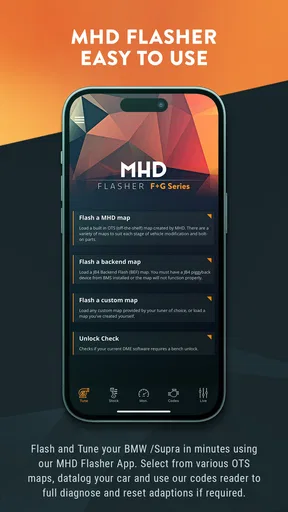
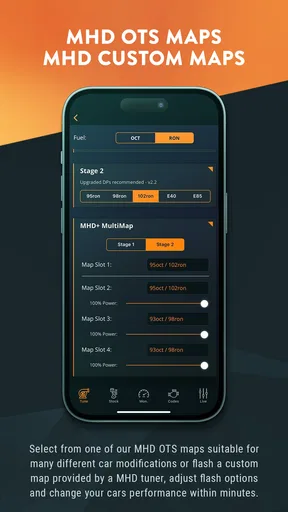
MHD Flasher is an automotive tuning application designed for compatible BMW vehicles. It works with supported engine control units to read, save, and flash software maps, allowing users to adjust performance-related settings such as power delivery, throttle response, and other calibration parameters. The exact features depend on the vehicle, engine, ECU version, purchased license, and available map files, so compatibility should be checked before downloading or flashing anything.
Which BMW vehicles and devices are compatible with MHD Flasher?
Compatibility is one of the most important points to verify before using MHD Flasher. Support can vary according to the BMW model, production year, engine, ECU type, transmission, and software version. The app generally requires a compatible Android device and an approved communication adapter or cable connected to the vehicle. Before purchase, users should consult the official compatibility list and confirm that their phone, adapter, and vehicle configuration are supported.
Is MHD Flasher safe to use on my car?
MHD Flasher can be used safely when the vehicle is fully compatible and the flashing procedure is followed carefully, but ECU tuning always involves some risk. A weak battery, interrupted connection, incorrect map, or unsupported software version may cause errors or leave the vehicle unable to start. It is recommended to use a battery charger designed for programming, avoid interruptions, back up the original software, and understand the possible mechanical and warranty consequences.
Does MHD Flasher require payment or additional purchases?
The MHD Flasher app may be free to install, but important tuning functions commonly require a paid license, map pack, or individual software purchase. Users may also need a compatible Wi-Fi, Bluetooth, or wired adapter, depending on the vehicle and setup. Pricing and available options can differ by engine platform and region. Review the in-app purchase details and total equipment requirements before committing to a flash.
Can MHD Flasher restore the original factory software?
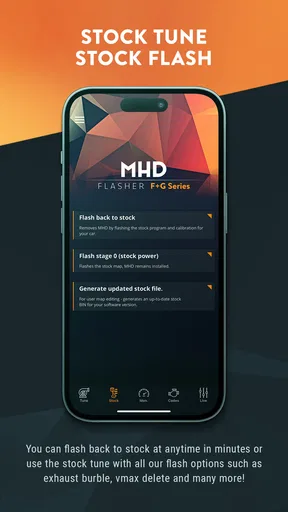
In many supported configurations, MHD Flasher allows users to save or reinstall the vehicle’s original factory calibration, which can be useful before returning the car to stock or visiting a dealer. However, restoration depends on the ECU, the available license, and whether a correct backup was created. Users should never assume that recovery is guaranteed after an interrupted flash, and they should keep all original files and follow the official instructions carefully.


